

• About
  • Advertise
  • Privacy & Policy
  • Contact
No Result
View All Result
iPunkt Blog
  • Home
    • Home – Layout 1
  • Home
    • Home – Layout 1
No Result
View All Result
iPunkt Blog
Home Apps

Turn Your MacBook Notch into a Mini Hub – Meet BoringNotch

iPunkt by iPunkt
17 February 2026
in Apps
0
Turn Your MacBook Notch into a Mini Hub – Meet BoringNotch
0
SHARES
10
VIEWS
Share on FacebookShare on Twitter

The MacBook notch is… controversial.

Some people ignore it.
Some hide it with menu bar tricks.
And some developers decided to make it useful.

That’s exactly what BoringNotch does.

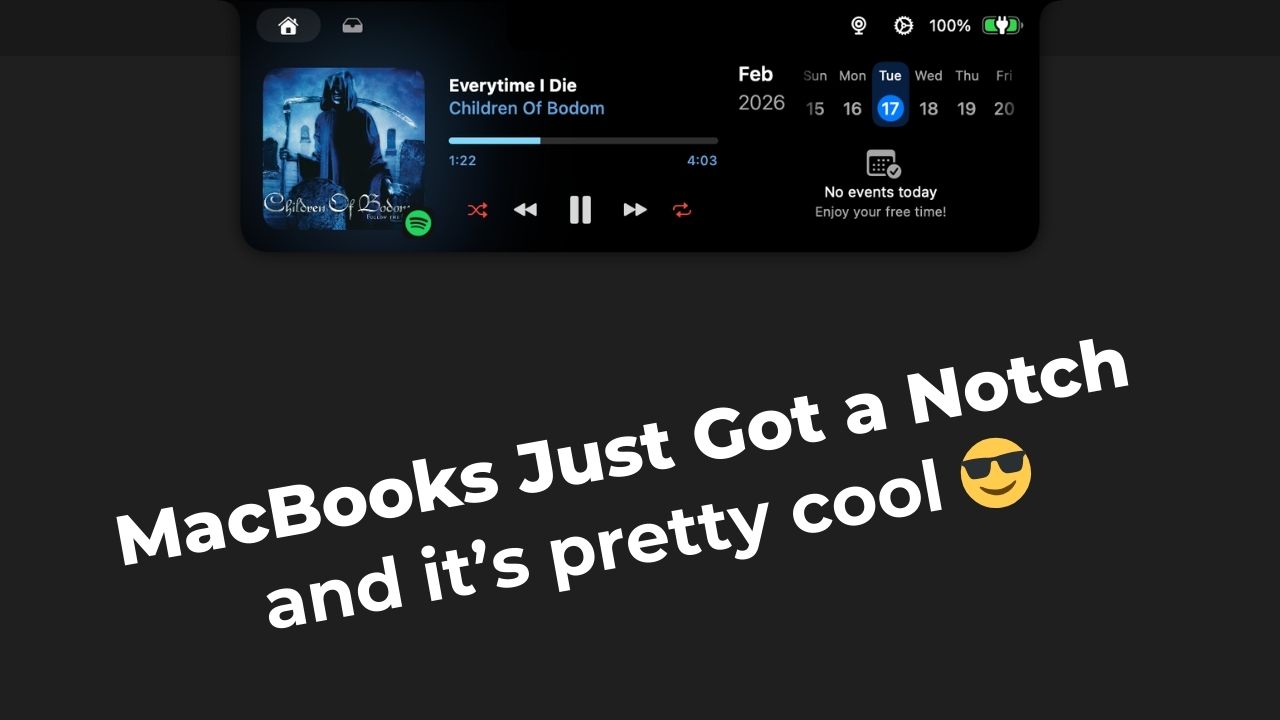
Instead of pretending the notch isn’t there, BoringNotch transforms it into a small interactive hub, giving you quick access to tools and controls right from the top of your screen.

And surprisingly… it feels native to macOS.

What BoringNotch actually does

Once installed, the notch becomes interactive when you hover your cursor over it. From there, you can access things like:

  • Media playback controls
  • “Mirror” (using the MacBooks camera)
  • AirDrop shortcuts
  • Calendar access
  • Quick file drop/sharing

It’s subtle, but very practical, especially if you like keeping your desktop clean and minimal.

It feels more “Apple” than you’d expect

The animations are smooth. The blur effects match macOS, and the controls expand out of the notch in a way that feels surprisingly natural. If you didn’t know better, you might think this was an experimental Apple feature. It doesn’t try to do too much and that’s why it works.

Is it beginner friendly?

Very. Installation takes less than a minute, the app is completely free, and most features work out of the box. You don’t need to customize anything, but you can if you want to. So whether you’re new to macOS or deep into customization, it fits both workflows.

Should you install it?

If you own a notched MacBook and enjoy small quality-of-life upgrades, BoringNotch is an easy recommendation. It doesn’t reinvent macOS. It just makes use of something that was already there.


Tags: AppmacOS
Previous Post

Launchy – The Elegant macOS App Launcher

iPunkt

iPunkt

The fact that l cannot explode into a thousand bats to escape awkward social situations is a constant source of irritation.

Leave a Reply Cancel reply

Your email address will not be published. Required fields are marked *

Stay Connected test

  • 99 Subscribers
  • Trending
  • Comments
  • Latest
Turn Your MacBook Notch into a Mini Hub – Meet BoringNotch

Turn Your MacBook Notch into a Mini Hub – Meet BoringNotch

17 February 2026
Launchy – The Elegant macOS App Launcher

Launchy – The Elegant macOS App Launcher

17 February 2026
Launchy – The Elegant macOS App Launcher

Launchy – The Elegant macOS App Launcher

0
Turn Your MacBook Notch into a Mini Hub – Meet BoringNotch

Turn Your MacBook Notch into a Mini Hub – Meet BoringNotch

0
Turn Your MacBook Notch into a Mini Hub – Meet BoringNotch

Turn Your MacBook Notch into a Mini Hub – Meet BoringNotch

17 February 2026
Launchy – The Elegant macOS App Launcher

Launchy – The Elegant macOS App Launcher

17 February 2026

Recent News

Turn Your MacBook Notch into a Mini Hub – Meet BoringNotch

Turn Your MacBook Notch into a Mini Hub – Meet BoringNotch

17 February 2026
Launchy – The Elegant macOS App Launcher

Launchy – The Elegant macOS App Launcher

17 February 2026
iPunkt Blog

A curated space exploring apps, macOS tips, productivity tools, emerging technologies, and standout digital experiences. iPunkt Blog delivers practical tutorials, thoughtful reviews, and real-world workflows to help modern users navigate and optimize their digital lives.

Follow iPunkt

  • About
  • Advertise
  • Privacy & Policy
  • Contact

© 2026 iPunkt Blog - All Rights Reserved

No Result
View All Result

© 2026 iPunkt Blog - All Rights Reserved