

• About
  • Advertise
  • Privacy & Policy
  • Contact
No Result
View All Result
iPunkt Blog
  • Home
    • Home – Layout 1
  • Home
    • Home – Layout 1
No Result
View All Result
iPunkt Blog
Home Apps

Launchy – The Elegant macOS App Launcher

iPunkt by iPunkt
17 February 2026
in Apps
0
Launchy – The Elegant macOS App Launcher
0
SHARES
7
VIEWS
Share on FacebookShare on Twitter

One thing I’ve always loved about macOS is how clean it looks.

But the Dock? Not so much, especially when it’s always visible, full of apps and taking away your screen real estate.

If you’re trying to keep your desktop minimal, hiding the Dock helps… but it also makes launching apps slower. That’s where Launchy comes in.

Launchy is a small macOS utility (€4 one-time purchase) that gives you a faster, cleaner way to open apps without relying on the Dock or Spotlight.

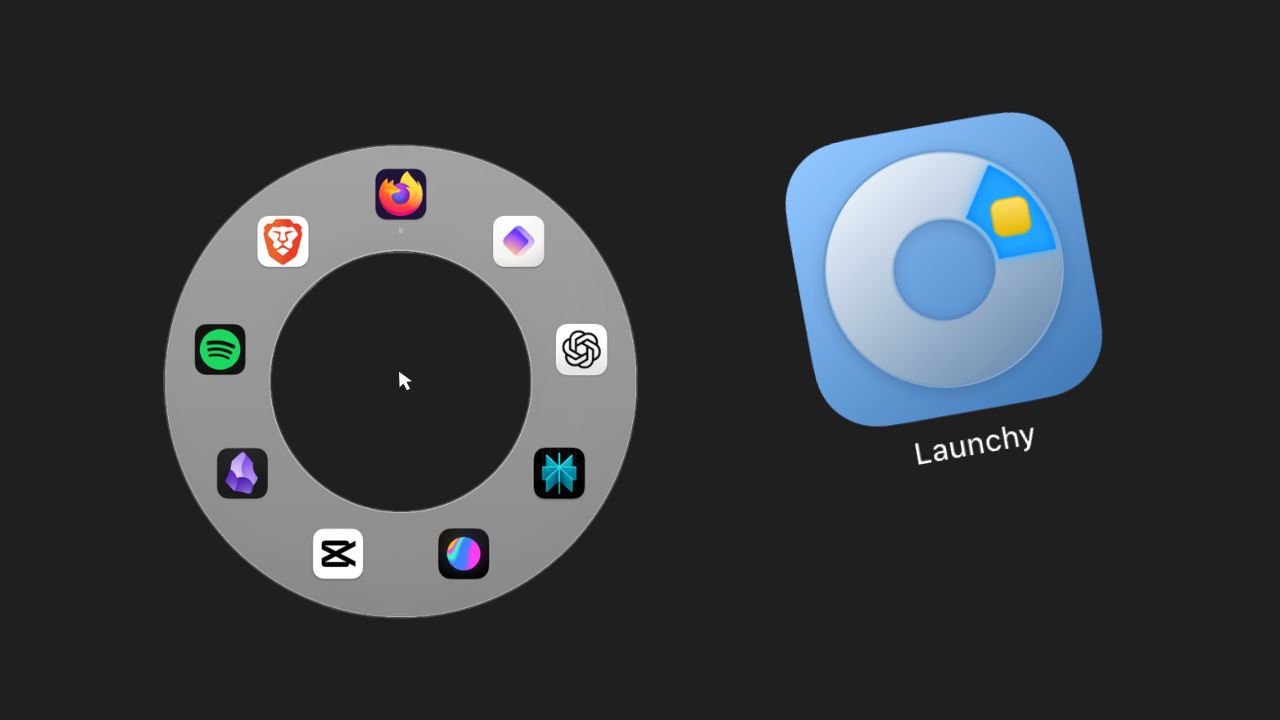
Press ⌘ Command + ⌥ Option and a circular launcher appears around your mouse cursor, showing the apps you’ve added. No moving your cursor. No clutter. Just launch and go.

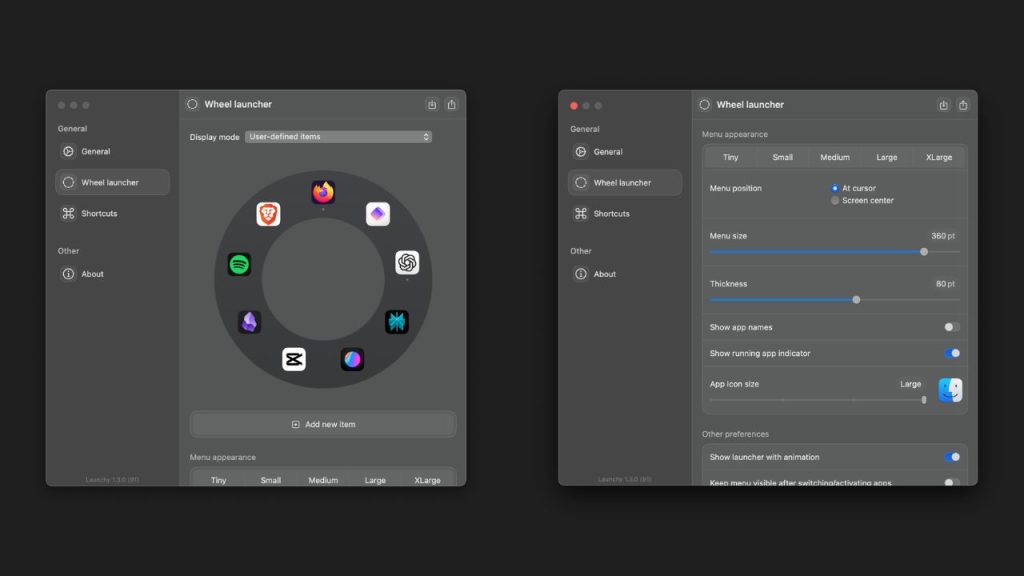
What you can customize

Launchy is surprisingly flexible for such a small app:

  • Choose which app appear in the circle
  • Adjust icon size
  • Change launcher position (cursor or screen center)
  • Edit circle size and thickness
  • Show running app indicators
  • Toggle app names
  • Enable haptic feedback

It takes less than 5 minutes to set up and then it just works.
How it feels in daily use

This is one of those tools that feels small… until you get used to it. Launching apps from your cursor saves time, especially on bigger screens. And visually, it keeps your desktop much cleaner than a permanent Dock. Of course, you’re not replacing macOS features. You can still use the Dock or launch apps via Spotlight (⌘ + Space) Launchy just adds another, faster option.

Should you try it?

If you like customizing macOS or want a more minimal workspace, Launchy is an easy recommendation. It’s lightweight, affordable, and adds that subtle “je ne sais quoi” 🤌🏻 to your workflow.

Tags: AppmacOS
Next Post

Turn Your MacBook Notch into a Mini Hub – Meet BoringNotch

iPunkt

iPunkt

The fact that l cannot explode into a thousand bats to escape awkward social situations is a constant source of irritation.

Next Post
Turn Your MacBook Notch into a Mini Hub – Meet BoringNotch

Turn Your MacBook Notch into a Mini Hub - Meet BoringNotch

Leave a Reply Cancel reply

Your email address will not be published. Required fields are marked *

Stay Connected test

  • 99 Subscribers
  • Trending
  • Comments
  • Latest
Turn Your MacBook Notch into a Mini Hub – Meet BoringNotch

Turn Your MacBook Notch into a Mini Hub – Meet BoringNotch

17 February 2026
Launchy – The Elegant macOS App Launcher

Launchy – The Elegant macOS App Launcher

17 February 2026
Launchy – The Elegant macOS App Launcher

Launchy – The Elegant macOS App Launcher

0
Turn Your MacBook Notch into a Mini Hub – Meet BoringNotch

Turn Your MacBook Notch into a Mini Hub – Meet BoringNotch

0
Turn Your MacBook Notch into a Mini Hub – Meet BoringNotch

Turn Your MacBook Notch into a Mini Hub – Meet BoringNotch

17 February 2026
Launchy – The Elegant macOS App Launcher

Launchy – The Elegant macOS App Launcher

17 February 2026

Recent News

Turn Your MacBook Notch into a Mini Hub – Meet BoringNotch

Turn Your MacBook Notch into a Mini Hub – Meet BoringNotch

17 February 2026
Launchy – The Elegant macOS App Launcher

Launchy – The Elegant macOS App Launcher

17 February 2026
iPunkt Blog

A curated space exploring apps, macOS tips, productivity tools, emerging technologies, and standout digital experiences. iPunkt Blog delivers practical tutorials, thoughtful reviews, and real-world workflows to help modern users navigate and optimize their digital lives.

Follow iPunkt

  • About
  • Advertise
  • Privacy & Policy
  • Contact

© 2026 iPunkt Blog - All Rights Reserved

No Result
View All Result

© 2026 iPunkt Blog - All Rights Reserved